
From Bounce Back to Inbox: How to Solve Email Delivery Issues
A bounce means that your message never made it.We can fix bounce-backs. First you just need to understand what’s going on.
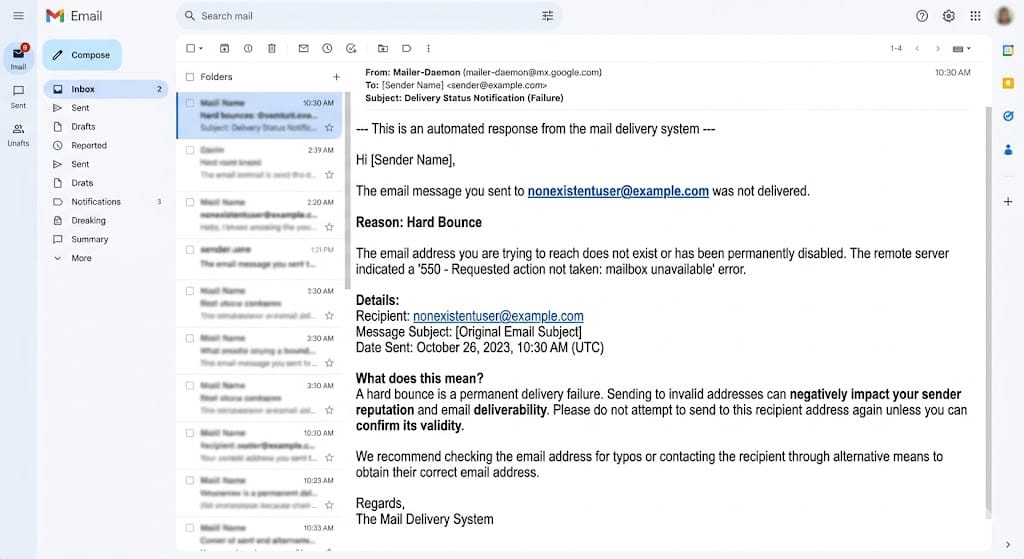
Ever sent an email and got a strange automated reply back saying something like "Message not delivered" or "Address not found"? That’s called an email bounce back — and if it happens often, it’s a problem worth taking seriously.
A bounce means that your message never made it, whether you’re sending newsletters, password resets, order confirmations, or just a regular business email. It’s like sending a letter and getting it back in your letterbox with a big red stamp on it that says “Return to Sender."
Good news? We can fix bounce-backs. First you just need to understand what’s going on.
So What Exactly Is an Email Bounce Back?
An email bounce back is when an email you sent was undeliverable and it was returned to you. Usually a brief description is given, such as "this inbox does not exist" or "full mailbox."
These bounce messages are automatically generated by the receiving mail server. It's basically the email system saying, "Hey, something went wrong here, tap you on the shoulder."
Why this is more important than you think: Each bounce adds a stain to your sender reputation, a number that email providers like Gmail and Outlook use to decide if your emails are trustworthy.
Too many bounces and your future emails start going to spam. Or even worse, they just stop coming.
The Two Types of Email Bounces (Soft vs. Hard)
Not all bounces are equal. There are two main types, and they each mean something different.
Soft Bounces: The Temporary Kind
A soft bounce means your email actually reached the other server, but something got in the way at the last minute. It's a temporary problem, not a permanent one.
Common reasons this happens:
- The recipient's inbox is completely full
- The mail server was down or too busy at that moment
- Your email file was too large to be accepted
- The server put you in a short waiting queue (called greylisting)
Think of a soft bounce like showing up to someone's house and knocking, but they're in the shower. They're home, but they can't answer right now. You can try again later.
What to do: Wait and retry. If an address keeps soft-bouncing after three to five attempts, it's a sign you should stop sending to it and check whether the address is still valid.
Hard Bounces: The Permanent Kind
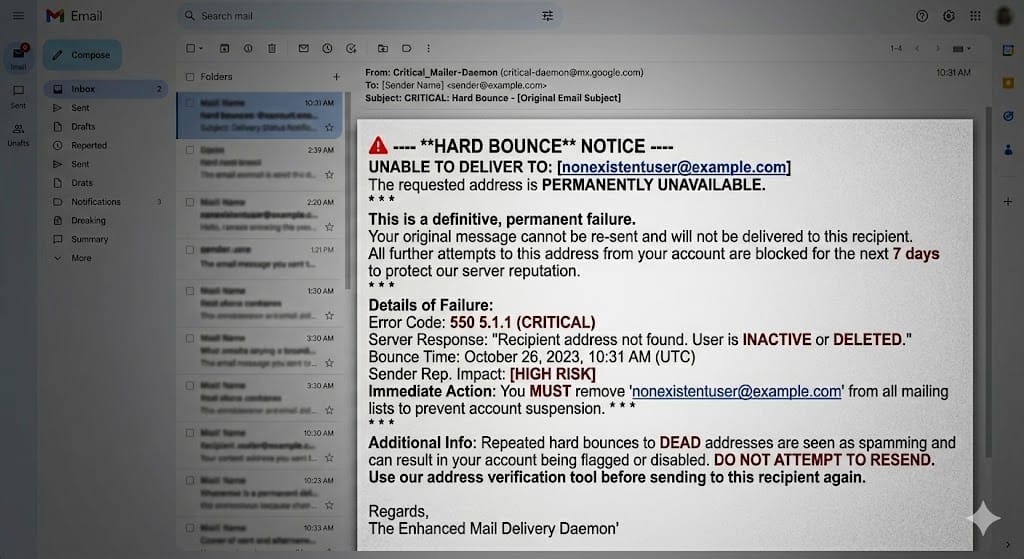
A hard bounce is more serious. It means the email could not be delivered and there's no point trying again. The door doesn't exist.
This usually happens because:
- The email address doesn't exist (maybe it was deleted or mistyped)
- The domain name is wrong or no longer active
- Your domain or IP address has been flagged or blocked
If you get a hard bounce, take that email address off your list immediately. Hard-bouncing email addresses are like sending mail to a house that doesn't exist anymore. It's useless and makes you look bad to the postal service (or in this case, Gmail and Outlook).
Why Do Bounce Backs Happen in the First Place?
Here are the most common culprits, explained simply:
1. The Email Address Is Invalid
This is the most common cause of hard bounces. The address you're emailing simply doesn't exist anymore, or maybe it never did.
How does this happen? People mistype their email when signing up (gamil.cominstead of gmail.com). Bots fill out forms with fake addresses. Or someone's old work email becomes inactive when they leave a company.
The fix: Verify email addresses before you send to them. There are tools that check whether an address is real before your campaign even goes out.
2. The Inbox Is Full
Some people never clear out their email. If a mailbox reaches its storage limit, it cannot accept new email. This is a soft bounce. This isn’t your fault, and trying again in a few days may work. But if it happens again, the address is probably not being watched and not worth keeping on your list.
3. Your Email Looks Like Spam
If your content triggers spam filters, the receiving server might block your message entirely. This can happen because
- Your email domain isn't properly authenticated (more on this in a moment)
- Your subject line contains certain words that spam filters don't like
- You're sending from a brand-new email address with no track record
The fix: Set up proper email authentication records (SPF, DKIM, and DMARC). These are technical settings in your domain's configuration that tell the world, "Yes, this email really is from us." Most email-sending platforms will walk you through setting these up.
4. Your DNS Records Are Misconfigured
Behind every email address is a set of technical settings called DNS records. These tell other servers how to handle your email. If something is misconfigured, a missing record, or an outdated setting, some servers will simply reject your emails.
This is a more technical fix, but tools like MXToolbox (free to use) can check your DNS setup and flag anything that looks off.
5. You're Sending Too Many Emails Too Fast
Email providers have limits on how many emails they'll accept from a single sender in a short window. If you blast out a huge campaign all at once, some emails might get bounced just because the system got overwhelmed.
The fix: Spread out your sending. Instead of firing 10,000 emails in one hit, stagger them over several hours or days. This is called email throttling, and it's standard practice for anyone sending at scale.
What the Error Codes Actually Mean
When you get a bounce notification, it usually includes a code. Here are the ones you'll see most often:
- 550 — The email address doesn't exist. Classic hard bounce.
- 552 — Your email was too large for the recipient's server to accept.
- 421 — The server is temporarily unavailable. Try again later.
- 554 — Your message was rejected, often because it was flagged as spam.
You don't need to memorize all of these. The key takeaway is if you see a 5xx code starting with 55, it's almost always a hard bounce that won't fix itself. If you see 4xx codes, it's more likely a temporary soft bounce.
How to Prevent Bounce Backs Before They Happen
The best cure is prevention. Here's what actually works:
Clean your email list regularly. Over time, email addresses go stale. People change jobs, abandon old accounts, or delete them entirely. Industry estimates suggest that around 20–30% of an email list becomes outdated each year. A list that was perfectly clean 18 months ago might have thousands of bad addresses in it today. Regular cleaning is not optional. It's maintenance.
Use a real-time email validator at the point of sign-up. When someone types their email into a form on your website, a validation tool can check in the background whether that address is real before they even hit submit. This stops bad addresses from getting into your list in the first place.
Set up a double opt-in process. With double opt-in, anyone who signs up for your list gets sent a confirmation email and has to click a link to verify they're real. It adds a tiny bit of friction upfront, but it ensures every person on your list actually has access to that inbox.
Authenticate your sending domain. If SPF, DKIM, and DMARC sound foreign to you, ask your developer or email platform provider to set them up. These authentication records are like showing ID at the door — without them, many servers will turn your emails away without a second thought.
Warm up new email domains gradually. If you're starting to send from a new domain or IP address, don't jump straight to sending thousands of emails. Start small — a few dozen a day — and build up over a few weeks. This gives mail servers time to recognize you as a legitimate sender.
What Happens If You Ignore Your Bounce Rate?
If bounce-backs go unchecked, here's the chain reaction that follows:
- Your sender reputation drops.
- More of your emails start landing in spam, even to people who want them.
- Email providers start blocking your domain or IP entirely.
- You end up on an email blacklist, which can take weeks or months to get removed from.
For businesses that rely on email for onboarding, sales, or customer communication, this is a serious hit. Password reset emails that don't arrive. Purchase confirmations that never get delivered. Newsletters that vanish into spam folders. Every one of those is a customer who gets frustrated and loses trust.
A Quick Look at What "Good" Looks Like
Most email marketing professionals aim to keep their bounce rate below 2%. Some benchmarks put the ideal target closer to 0.5–1% for established senders.
If your bounce rate creeps above 2%, it's time to take action — clean your list, check your authentication setup, and investigate whether any of your sending domains or IPs have been flagged.
If you're not sure where you stand, many email platforms show your bounce rate right in the dashboard. It's worth checking regularly, not just when something seems wrong.
The Bottom Line
Email bounce backs are annoying, but they're not a mystery. They happen for clear, fixable reasons — invalid addresses, full inboxes, spam filters, authentication gaps, or sending too fast.
The key is to treat bounces as feedback rather than failures. Every bounce notification is the email system telling you something useful: this address is bad, this domain doesn't exist, or this content looks suspicious. If you listen to that feedback and act on it. Clean your list, authenticate your domain, and verify addresses before you send—you'll stay out of trouble.
A clean list, properly authenticated emails, and a sensible sending strategy will get you from the bounce-back folder to the inbox where your messages belong.