When you think about ‘email testing’ what does that actually mean? At first, many thoughts could come to mind, such as, sending an email and checking if it looks good, checking if emails are running in the production environment, outbound is delivering, inbound routes are defined and routing appropriately and so much more.
There is still so much to this from a staging to production environment that becomes an important facet of all systems when deploying new updates, new user-triggered email actions, new email streams that deliver outbound to clients as well anything in general that is considered a critical email (transactional). The old saying of its better to be safe than sorry is quite literally why email testing platforms exist.
What is an Email Testing Platform and how does it work?
It is a simulation that you can run in your staging environments to check every aspect of your email delivery pipeline, where every message gets delivered to the sandbox inbox. This runs thorough checks on content, authentication, spam risk and links, then allows you to simulate opens, clicks and replies to test complete flows from start to finish.
As an example with these platforms, you create a temporary email address within them such as [email protected] and in your application you might attempt to test the sign-up form in which upon successful completion it should send you a beautiful looking HTML template, with the user’s credentials added to it for personalisation, and a custom link to confirm the account.
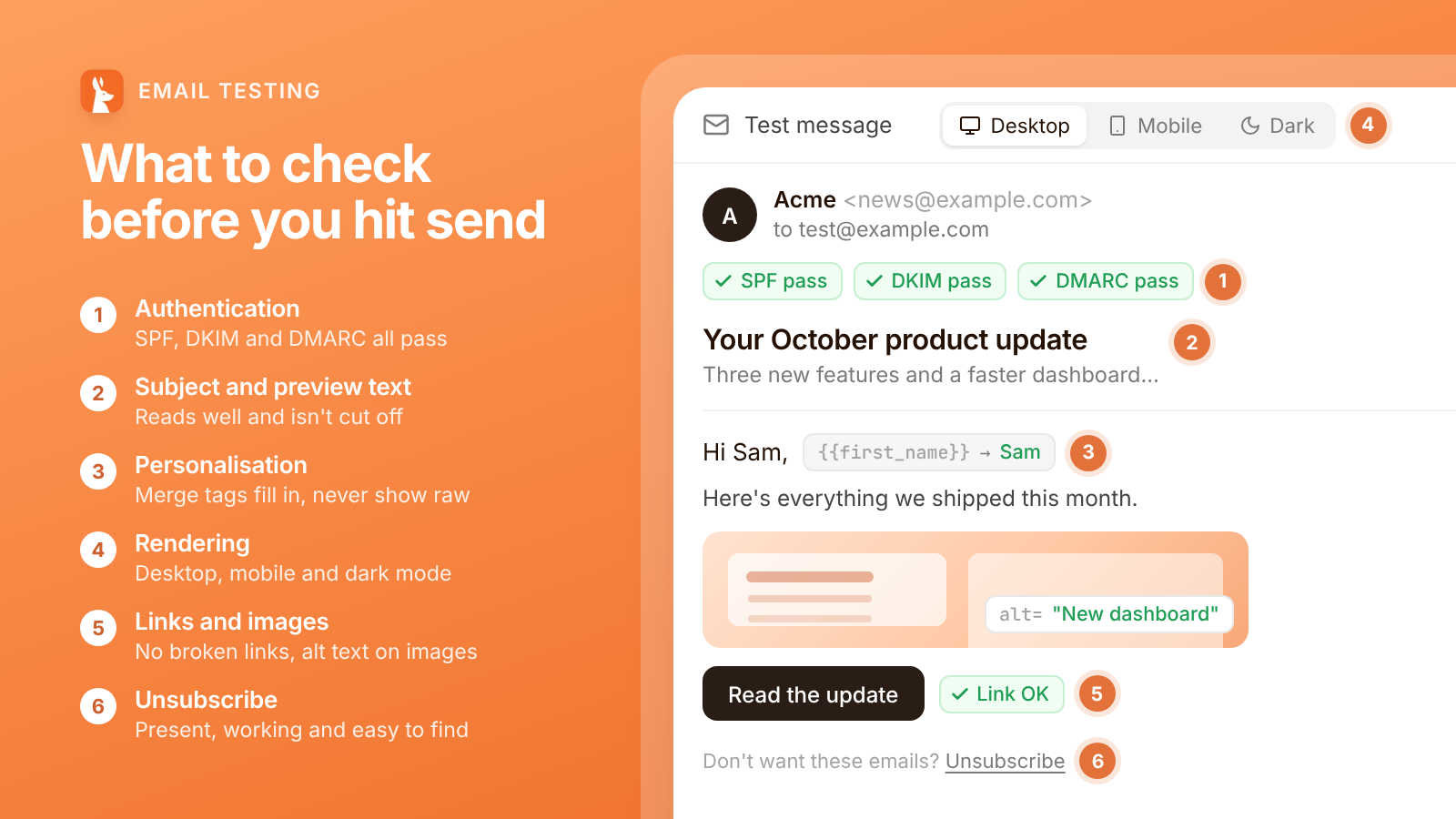
This email then gets sent and received within that inbox on the platform, in which you can see how it looks on desktop and other devices, scored against spam filters, if the domain passes all authentication checks as well as simulate user events such as opens, clicks, complaints and more.
The beauty in this, is that before you deploy your application into the production environment for all to use and see, you can see how everything runs in real-time by testing it out yourself manually. As you can tell too, this just doesn’t stop at sign-up forms, any action within your application that triggers an email send can be used and sent to this platform for running the simulation. So you can absolutely catch all the bugs, broken and bad email formats you might have before letting your scaling user-base see them.
To give you a more thorough breakdown of how deep these platforms run, this is typical of what a great email testing platform will do for you.
SMTP sandbox
Swap in your sandbox SMTP credentials, and every email your app sends is captured inside Maileroo instead of being delivered. Use the full API to fetch messages and run assertions in your CI/CD pipeline, without reaching real recipients or touching production.
Test inboxes
Create permanent or temporary inboxes from the dashboard or the API, so each CI/CD run or test scenario gets its own address. Receive mail from your app or any third-party service instantly, and inspect each one without involving real recipients.
Email inspection
Preview every captured message in light and dark mode to see how it looks in email clients. Check headers and SPF, DKIM and DMARC results, while Rspamd scoring and RBL checks flag spam and blocklist issues before launch.
AI analysis
Get a delivery score out of 100, with AI breaking down filter risk, sender clarity, content quality and promotional intensity. Catch spammy or overly salesy wording and know what to fix before your emails reach real inboxes.
Recipient actions
Open emails to fire your real tracking pixel, click links to test redirects, and send replies, unsubscribes, auto-replies and ARF complaints. Confirm your app handles every event before it happens in production.
So you can absolutely see the power of an email testing platform before you deploy to production. Especially in the age of AI where people are deploying new features and apps more quicker than ever, it is vital to run these checks to ensure it holds up in front of your users.
Now whilst this approach is great on the eyes in its manual style, it doesn’t always need to be like that, there is the opportunity to automate this process and let your CI/CD pipeline run this for you with some platforms that offer it. For example, with the Maileroo platform you can run this inside of your CI/CD pipeline whereby these checks, test sends and actions can all be handled and checked off automatically.
That way, during each of your deployments you can have this run to verify everything is working in your pipeline before it goes to production. Like I said, it is better to be ‘safe than sorry’.
The AI angle
In this age of AI where shipping features and apps has become as quick as within an hour (I know how crazy…), you also need to have a level of what I call ‘seriousness’ in your setup where if you wish to expand and develop a platform that users can consistently use without problems, then you need to ensure all facets of it work accordingly.
Yes you could just find the bug along the way once a user reports it, get AI to fix it and then try again but there is more to this specific element of your app that goes beyond broken HTML emails.
Now we mention the quick introduction of all these features, how about the actual copy of email? The human element, has now become so important as it quite literally is being seen as a problem in all the emails people receive. All those onboarding emails, promotional newsletters and emails being received by your recipients, just seeing all those icons, dashes and word-slurp can easily get caught up in spam filters.
How do you come across testing if these emails are scored? Well, funny you ask that because this blog might provide you that answer in itself... Getting your emails tested for scores with well it might sound hypocritical but an 'AI Analysis', but these aren't just any random AI models, these are models trained on millions of emails, against major ESPs such as Gmail, Outlook and more to help understand how your emails would be perceived by spam filters.
Get a delivery score out of 100, with AI breaking down filter risk, sender clarity, content quality and promotional intensity. Catch spammy or overly salesy wording and know what to fix before your emails reach real inboxes.
Catch the bugs before they catch you
Let's say you setup a HTML template with dynamic variables such as {{first_name}} but through all this development, maybe your using AI or it was a simple oversight and you end up passing {{user_name}} instead, which does happen more often than one thinks... then your email is going to look a little like this...
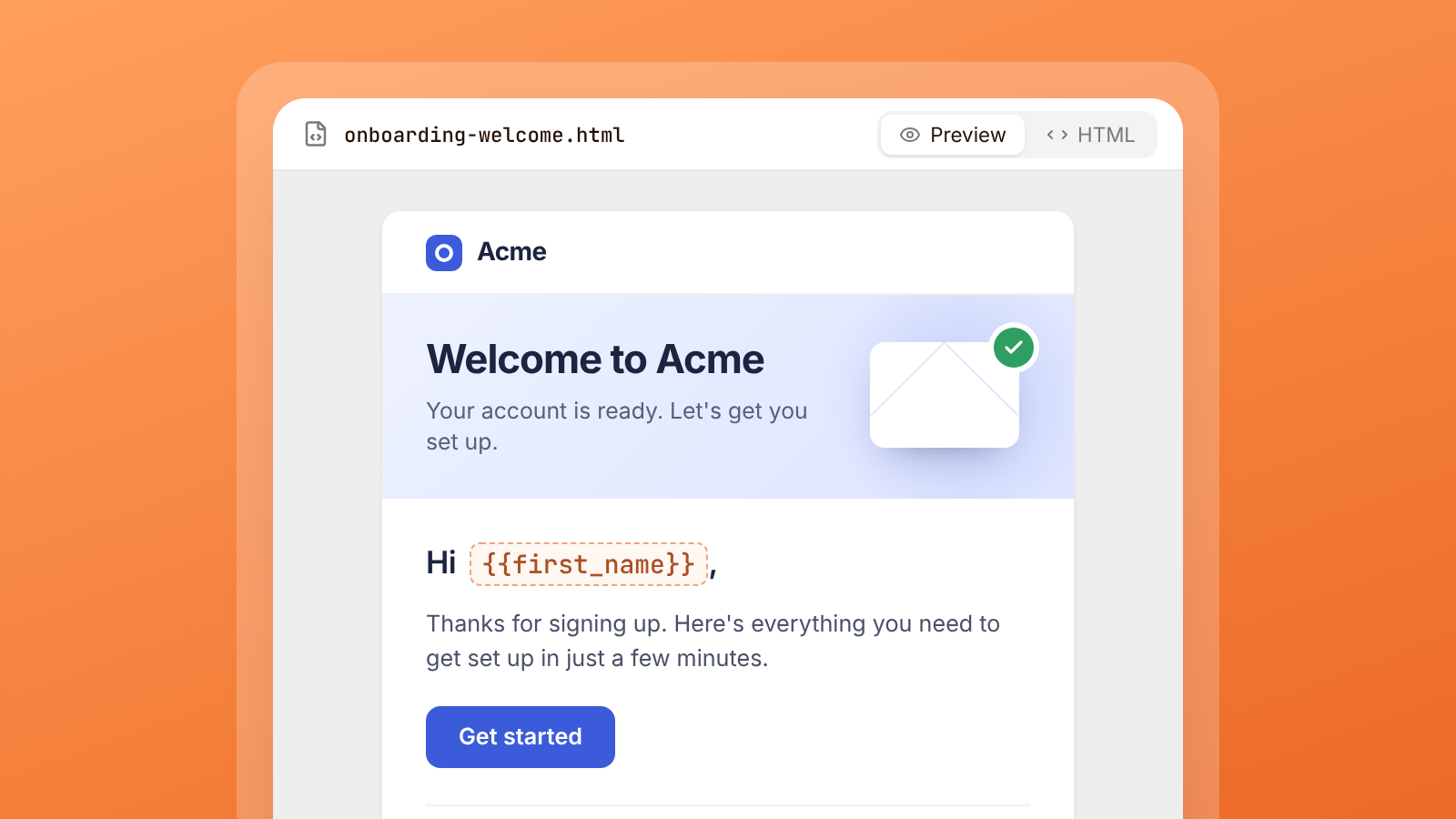
Now imagine that in a production environment, where personalized emails are very important to the onboarding and promotional scene. Now this oversight makes the business look relatively unprofessional and also this might not just stop at the name itself, but this could be for order_numbers, shipping_details and more critical information that needs to be passed.
This is where the Email Testing platforms can capture this data and show you how everything functions to ensure you are also passing the right variables into your templates. Another fantastic point in all of this too is what should be the reply-to address.
At Maileroo, we run onboarding emails to help engage our users with some helpful tips, check-ins and ensure they navigating the platform with as little problems as possible, and to find out more about that we set the reply-to address back to me (Patrick - Hey guys :D) and if we just set that up in the backend to some other address that we forgot to change back for production or some support address it might never have reached me. This way, I get all feedback and try to build a better relationship with our users too, so it also can have a positive effect on how users engage with your platform too.
Let me conclude with this
This portion of a system is clearly an oversight for many, and not something that people really consider important in their tech stack. But outlined here, is the very few reasons why it could be a make or break for you when scaling your growing business and getting on top of all of this early.
Implementing a system like this can help you find issues in your emails, how they are perceived by major spam filters, domain authentication checks, how the email itself looks in different inboxes and more. The fantastic thing about all of this is that this doesn't even take that long to setup for any one system. You could run manual checks as mentioned or even run it through your CI/CD pipeline for automated testing.
So next time you are building your next app, feature or tool for your users, remember that the first point of contact you have with them is usually over email and that form of critical communication in the masses sending the right information is what usually drives more engagement.